You’re probably here because you’ve worked hard to modularise your Go codebase and break it into some great libraries you can use again and again. You’re acing it and everything was going swimmingly until you ran dep ensure with a new import of your library, which is hosted privately on Bitbucket. Everything fell apart. It gave an error, or more likely, hung indefinitely in total silence.
Why do I have this problem?
The issue lies in the way in which dep resolves import paths, such as bitbucket.org/you/greatlib. We can find the answer in the Remote Input Paths documentation.
When a version control system supports multiple protocols, each is tried in turn when downloading. For example, a Git download tries
https://, thengit+ssh://.
In our case, neither these nor any other protocol will work as our repository is intentionally private. Unfortunately, if this is the case, no error is shown and dep hangs indefinitely. This may be resolved in the future, but we still can’t access our library.
A Solution
Okay. Less talk, more action. Here we’re going to walk through using SSH access keys to authenticate with your private repository and how to make sure your chosen platform can access them.
If this is not an option, it should be noted there is also an approach using personal access tokens. As this article is specifically discussing SSH keys, we won’t go into detail here, but there’s a notes section at the end with a brief outline.
1. Add an access key to your Bitbucket Repository
Access keys allow read-only access to a repository. If you’re not the owner of the repository or a member of the team that owns it, then you’ll need to add an SSH key here to be given access. Head over to Settings then Access keys.
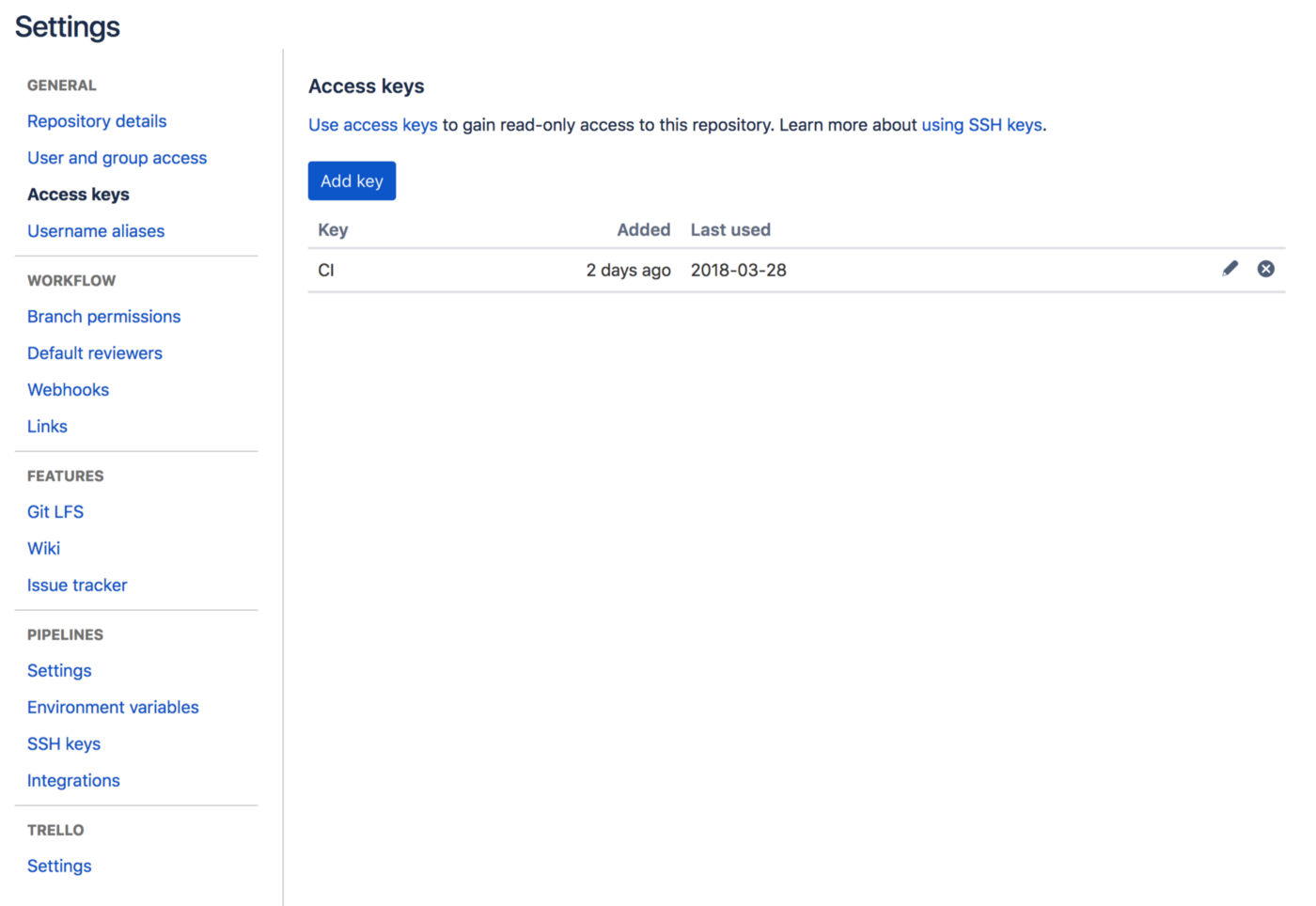
Your access keys can be found in Settings > Access Keys
Now, either paste a public key you’ve already generated for this, or alternatively generate a new one. If you’re using this for CI or anything else that you’re not in direct control of then follow the Principal of Least Privilege and generate a key only for this purpose.
2. Making use of the key
Now we have an access key, we need to put it somewhere.
Important: Another big gotcha here is dep will also fail if there is not a known_hosts entry for the specified host1, in this case Bitbucket. To rectify this, we can run git ls-remote which will create an entry in .ssh/known_hosts if one does not exist.
git ls-remote git@bitbucket.org:you/greatlib.git
In the most simple case, copy your key pair to ~/.ssh and run ssh-add . Remember to give them a different name so you don’t overwrite any existing keys.
cp id_rsa_mylib ~/.ssh
cp id_rsa_mylib.pub ~/.ssh
ssh-add ~/.ssh/id_rsa_mylib
If you’re using Docker, this is also pretty simple to achieve. Depending on the Docker image you’re using, you may need to install git and openssh via apt-get install or apk add. You’ll also need to make sure the SSH agent is running, using eval "$(ssh-agent)" will fix this if it isn’t.
FROM golang:1.9

# (other stuff omitted for brevity)

# Add your keys to the container
COPY ssh /root/.ssh
# Start the SSH Agent, add the SSH Key and then ensure our dependencies
RUN eval "$(ssh-agent)" && ssh-add /root/.ssh/id_rsa && dep ensure
For making life easier in development, you might also want to create a docker-entrypoint.sh which ensures the SSH agent is running and the key is added each time. This can then be added to the Dockerfile with the ENTRYPOINT command.
#!/bin/sh
set -e

eval "$(ssh-agent)"
ssh-add /root/.ssh/id_rsa

exec "$@"
CI varies depending on your chosen platform, but shouldn’t be too dissimilar. I’m using Drone CI, so the following is an example of the .drone.yml file.
pipeline:
  test:
    image: golang:1.9-alpine
    pull: true
    commands:
      - apk --update add git openssh
      - go get -u github.com/golang/dep/cmd/dep
      - cp -R ssh /root/.ssh
      # We need this or we'll be warned about our private key security.
      - chmod 0400 /root/.ssh/id_rsa
      - eval "$(ssh-agent)"
      - ssh-add /root/.ssh/id_rsa
      - cp -R src/app /go/src
      - cd /go/src/app
      - dep status -old
      - go test
    when:
      event: push
There we have it. Your keys are accessible and dep should run like a dream.
Protip: If you’re still stuck debugging, a good start is to make sure you running dep with the -v flag to enable verbose (although still quite terse to be quite honest) logging, which might give a little more insight.
Notes
Some of you may be aware that GitHub allows repository cloning with an access token using the following pattern:
https://username:{access_token}@github.com/user/repo.git
Bitbucket also offers a similar version of this for personal access tokens using the following:
https://x-token-auth:{access_token}@bitbucket.org/user/repo.git
This has not been tested with dep, but adding this to the [[constraint]] in your Gopkg.toml should also work too. The downside here of course is you’ll need an access token tied to a specific user, which may or may not be what you want.
References
Thanks to zkry on GitHub for pointing this out in this discussion. ↩︎